
Opening a new marketplace for the first time can leave you wondering where to begin. Should you create a buyer account or a vendor account? Where do you search for products, and how do you list what you sell?
This guide explains how to use MartVersity as a buyer or vendor, from creating the right account to taking your first useful action on the platform.
1. What Is MartVersity?
MartVersity is an online marketplace in Nigeria where students, everyday buyers, vendors and businesses can connect through products and services.
On the customer side, buyers can browse available listings, search for products, view business profiles and use the options provided to contact sellers or complete an order.
MartVersity also provides access to other everyday services. Depending on availability in your location and the version you are using, these may include food ordering, airtime and data purchases, electricity and cable payments, rides and wallet services.
For vendors, MartVersity Business provides a separate workspace for creating a business profile, publishing products, responding to customers, managing orders and monitoring payments.
2. Which MartVersity Account Should You Use?
MartVersity has different account experiences for customers and vendors. Choosing the right one makes the setup process easier.
The MartVersity Customer Account
Choose the customer account if you want to:
Search for products or services
Browse stores, food vendors and product categories
Read product information
Contact a business
Place and monitor an order
Use supported payment and everyday-service features
You can access the MartVersity customer marketplace through your browser. The customer app is also available on Google Play and the Apple App Store.
The MartVersity Business Account
Choose MartVersity Business if you sell products, food, or approved services.
The business account allows a vendor to:
Create a business profile
Upload products
Add prices and product descriptions
Manage stock information
Receive and manage orders
Respond to customer messages
Review transactions and payouts
Run available promotional features
You can create a seller account through MartVersity Business.
3. How to Use MartVersity as a Buyer
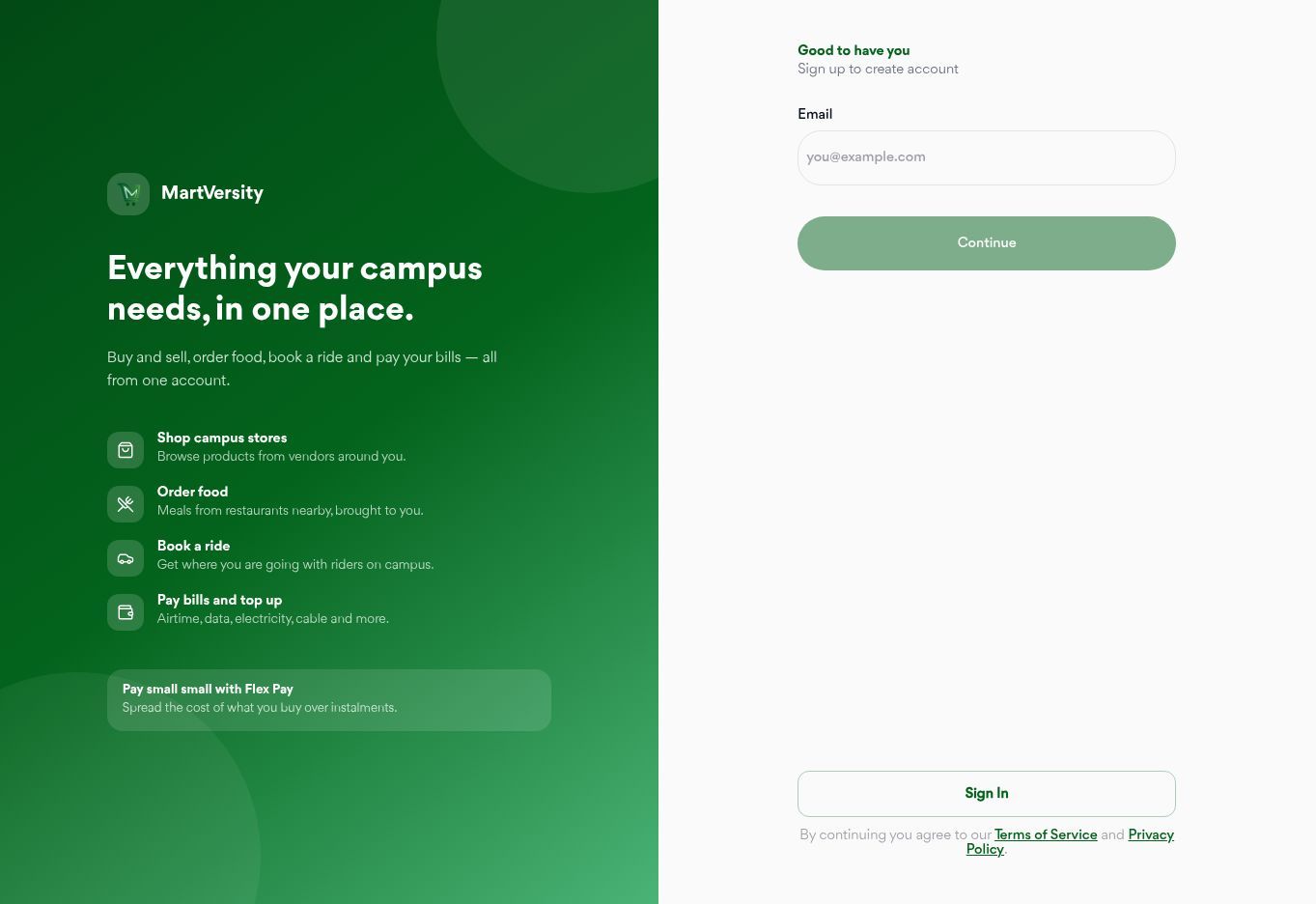
i. Create Your Customer Account
Open the MartVersity website or customer app and select Create Account.
Enter your email address and follow the instructions displayed on the screen. Complete every required part of your profile with accurate information.
Do not rush through this stage. The information you supply may affect account verification, order updates, and your ability to use certain features.
ii. Search for What You Need
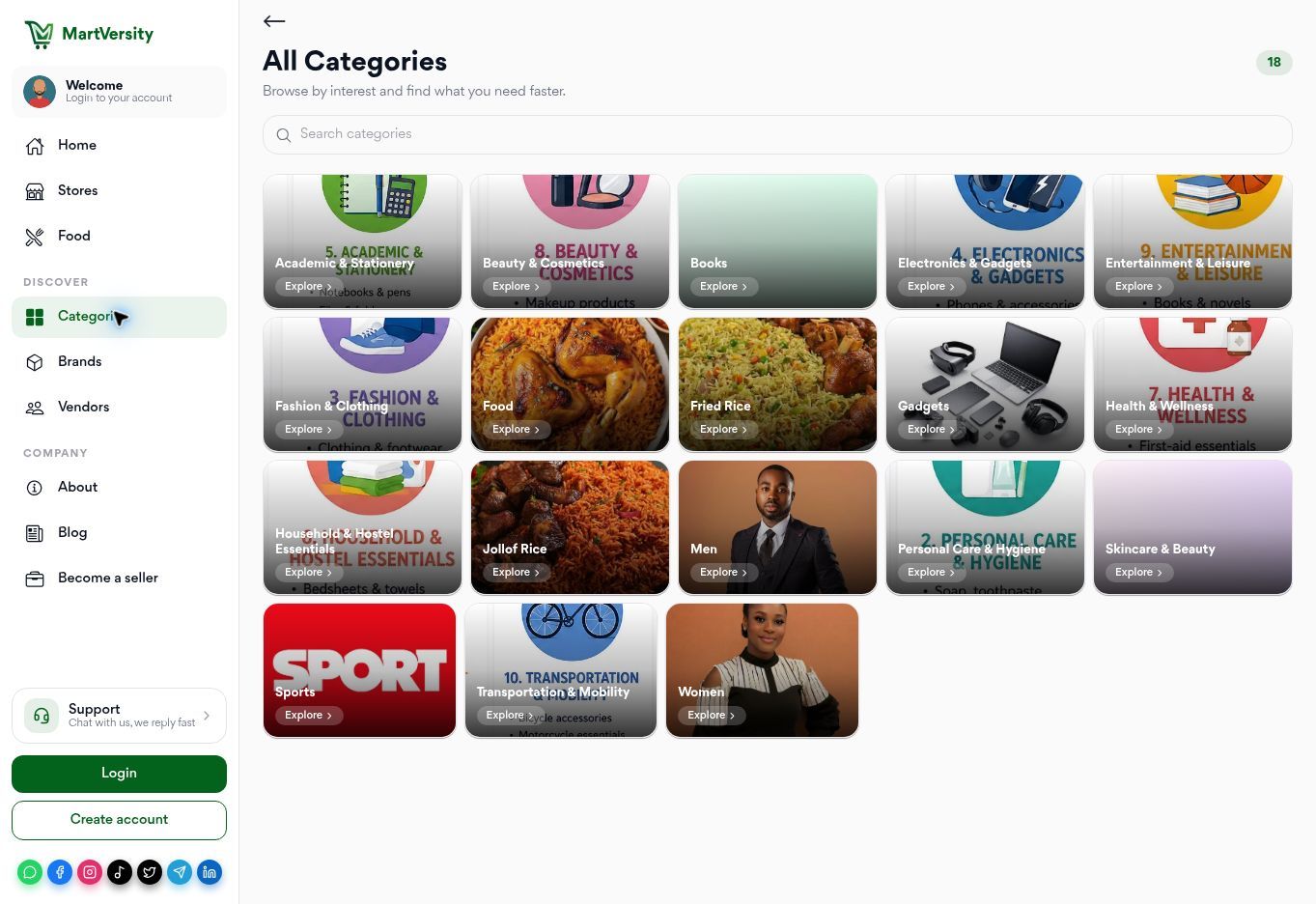
Once you are signed in, use the search bar to enter the product or service you want.
Be specific. Searching for “charger” may return several unrelated results. Searching for “HP EliteBook 840 charger” gives the platform and vendors a clearer idea of what you need.
You can also browse through:
New products
Stores
Food
Categories
Brands
Vendors
Spotlight content
The options displayed may depend on your location and the current version of the platform.
iii. Open the Listing and Read the Details
A clear photograph may attract your attention, but it should not be the only thing you check.
Open the listing and look for:
The exact product name
Current price
Product condition
Size, colour, model or specification
Available quantity
Seller or business information
Delivery or pickup information
The next action the seller expects you to take
iv. What if an important detail is missing?
Do not assume.
Use the available messaging feature to ask one clear question. For example:
Is this charger compatible with an HP EliteBook 840 G5, and is the displayed price still current?
A direct question gives the seller enough information to provide a useful response.
v. Compare Your Options
The first listing you see may not necessarily be the best option for your needs.
Compare the price, condition, specifications, seller information and fulfilment options. A lower price may look attractive, but it should not make you ignore incomplete information or unclear product photographs.
The purpose of comparing listings is not simply to find the cheapest product. It is to understand what each seller is offering before you make a decision.
vi. Follow the Approved Order Process
When you are ready to continue, follow the checkout, payment, delivery or pickup options shown in your account.
Review the product, amount and fulfilment details before confirming anything. If order tracking is available for that transaction, use your notifications or order page to follow its progress.
Do not rely on screenshots alone as proof that a payment or refund has been completed. Check the relevant transaction details inside your account.
4. How to Use MartVersity as a Vendor
Creating a vendor account is only the beginning. Buyers cannot understand what you sell if your business profile is empty or your listings leave out important information.
i. Open MartVersity Business
Visit MartVersity Business through your browser or install the business app where available.
The web version allows vendors to manage their businesses from a laptop or desktop without depending entirely on a phone.
ii. Create Your Seller Account
Enter your email address and follow the registration instructions.
You may be asked to provide:
Your business or shop name
Business category
Contact information
Identification details
Proof of address
Other information connected to your type of business
Individual sellers may also be allowed to register. However, certain product or service categories may require additional verification.
Use accurate information. A business name, address or identity detail that does not match the supporting information may delay the approval process.
iii. Complete Your Business Profile
A buyer should be able to open your profile and understand what your business does.
Add the relevant information, including:
Business name
Business description
Product or service category
Operating information
Delivery or pickup options
Approved customer-contact method
Keep the description simple. Explain what you sell and who it is useful for instead of filling the profile with general promises.
iv. Add Your First Product
Select the option for creating or adding a product and complete the required fields.
What should a useful product listing contain?
Include:
A specific product name
The current price
A clear description
Relevant size, colour, model or specifications
The current condition
Available stock quantity
Delivery or pickup information
Recent product photographs
Avoid descriptions such as “quality item available.” That wording tells the buyer almost nothing.
A better description would be:
HP EliteBook 840 G5 charger. New condition. Compatible with the listed HP model. Current price: ₦10,000. Confirm availability before placing your order.
Use clear photographs taken in good lighting. Show the front, back, and any details that a buyer may need to inspect.
v. Manage Orders and Customer Messages
When a customer places an order or sends a message, check the relevant section of the MartVersity Business dashboard.
Confirm the order only when you can fulfil it. If the product is no longer available, update the listing instead of allowing more people to continue enquiring about it.
Respond to genuine customer questions clearly. If different buyers keep asking the same question, consider adding that information to the product description.
vi. Share Your Product or Business Link
After your profile or product listing is live, use the available sharing option to copy its link.
You can share an approved MartVersity link through:
WhatsApp Status
Instagram bio
Facebook business page
X (formerly Twitter)
Email
Direct customer conversations
Do not send only the link. Add one short sentence explaining what the person will find when they open it.
For example:
You can view the available colours, prices, and product details through our MartVersity page: [insert link].
The exact name and position of the sharing button may differ between the website and app version.
5. What Else can you do on MartVersity?
MartVersity is not limited to ordinary product buying and selling.
Depending on your account, location, and the currently available features, the customer app may also allow you to:
Order food from available restaurants
Buy airtime and data
Pay supported electricity and cable bills
Fund or use a wallet
Book available rides
Monitor transactions and refunds
Contact MartVersity Support
Use referral features
View available opportunities and Spotlight content
Before completing any transaction, read the information shown on the relevant screen. Service availability, charges and processing requirements may differ.
6. Common Mistakes to Avoid
i. Creating an Account and Doing Nothing Else
A buyer will not find a product without searching. A vendor will not become visible simply by completing registration.
Take the next useful action. Search for a product, complete your business profile or publish your first listing.
ii. Publishing Incomplete Product Listings
A photograph and the word “Available” are not enough.
Give buyers the price, condition, specifications and other information they need to decide whether the product is relevant.
iii. Leaving Sold Products Online
Update the listing when a product is sold, restocked or temporarily unavailable. Outdated listings waste the buyer’s time and create more messages for the vendor.
iv. Using Unclear Photographs
Dark, heavily edited or distant photographs can make buyers uncertain about what they are seeing. Use recent images that represent the product honestly.
v. Ignoring Messages and Order Updates
If you cannot fulfil an order or need more information from a customer, communicate early. Silence makes a simple situation more difficult for everyone involved.
7. Frequently Asked Questions
Can I use MartVersity on a laptop?
Yes. Buyers can use the customer website, while vendors can access MartVersity Business through a browser. Some features may provide a fuller experience through the mobile apps.
Is MartVersity only for students?
No. Students remain an important part of the MartVersity community, but the marketplace also serves everyday buyers, individual vendors, and businesses.
Do I need a registered company to become a vendor?
Not always. Individual sellers may be allowed to create vendor accounts. However, some categories may require additional verification or business information.
What can vendors sell on MartVersity?
Vendors can list approved products and services supported by the platform. These may include gadgets, textbooks, fashion, food, and certain services. Available categories and requirements may change.
Why is my product not receiving enquiries?
Check whether the title is specific, the price is visible, the description answers basic questions, and the photographs clearly show the item. Also confirm that the product remains available and that your business profile is complete.
Start With One Useful Action
Learning how to use MartVersity becomes easier when you stop trying to understand every feature at once.
If you are a buyer, begin by creating your account and searching for one product you genuinely need.
If you are a vendor, create your MartVersity Business account, complete your profile, and publish one clear product listing.
Your account should not remain empty after registration.
Create your MartVersity account and take your first useful action today.
Comments